
TikTok agency eligibility checker: how it works and what each result means
Before you spend an invite, know whether a TikTok LIVE creator can join your agency. Scout Tools checks up to 30 creators at once through your agency's own Backstage and shows a clear result for each one.
$300/month + $16.44 processing costs, $316.44 billed monthly through Stripe.
What the eligibility checker does
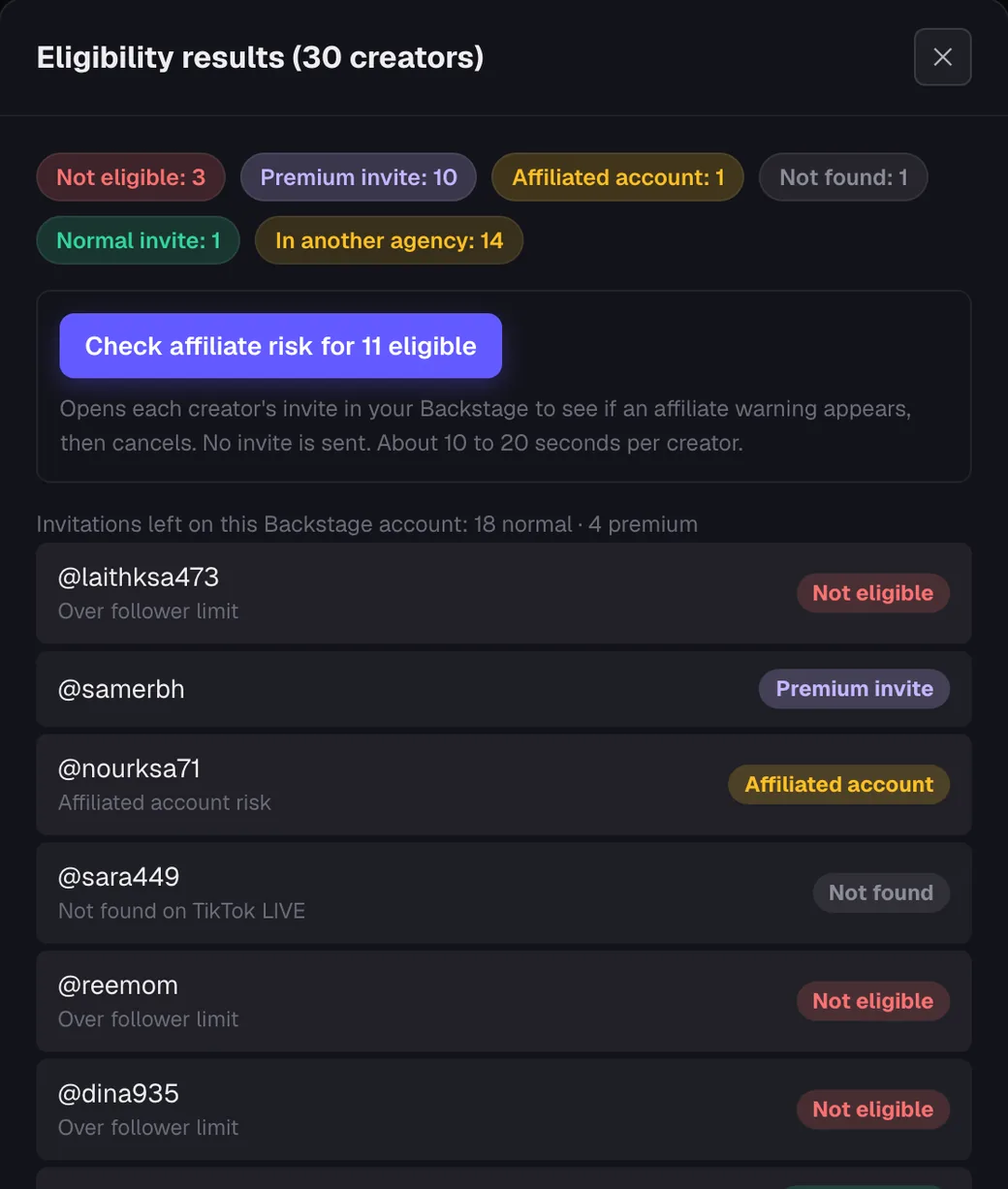
Backstage answers the question “can my agency invite this creator?” one creator at a time. The checker asks it for a whole batch and keeps the answers.
Because each check runs in your own signed-in Backstage session, the result reflects your agency: your region, your invitation types and your invitations left. Two agencies can get different answers for the same creator.
- Up to 30 creators per check, up to 3,000 per day per account
- Results saved on the board with the time they were checked
- Invitations left on your Backstage account, by type
- Optional affiliate-risk check for eligible creators
Eligibility results explained
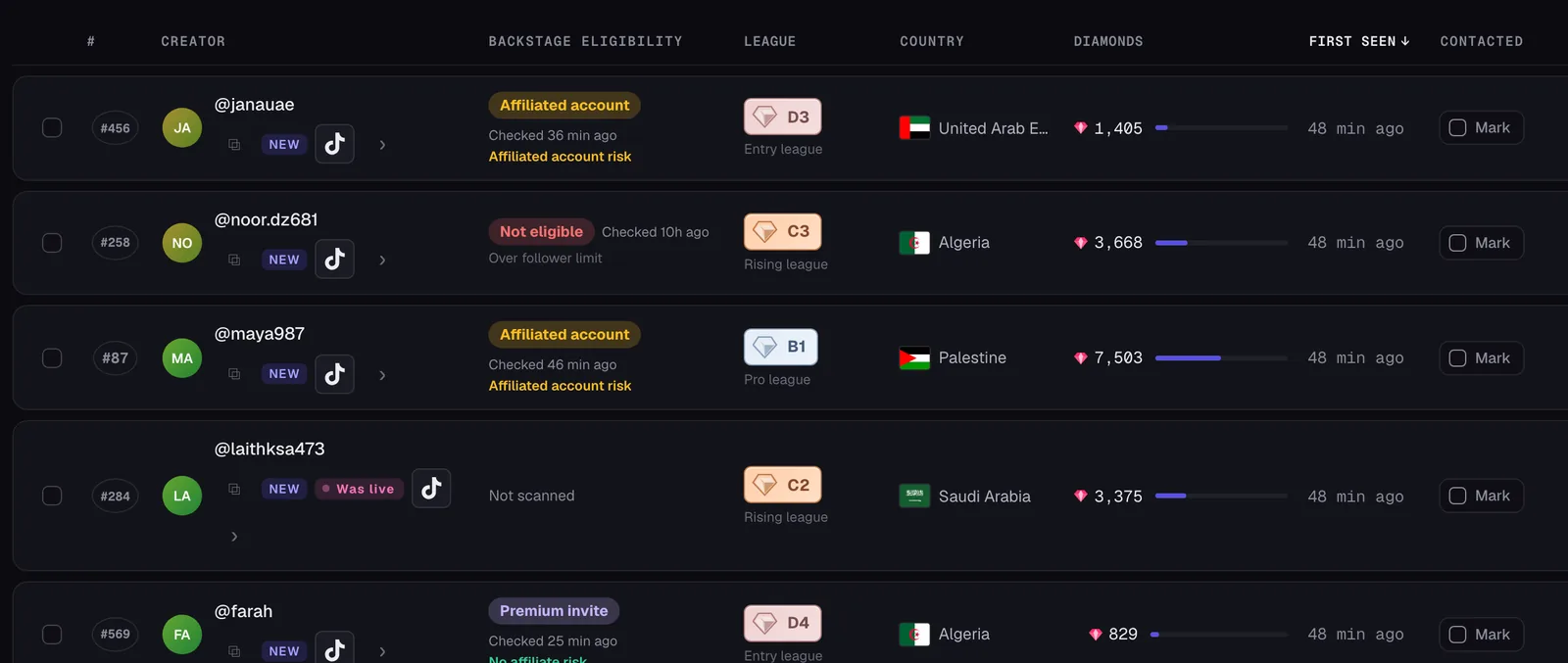
These are the results the checker can return. They follow what Backstage shows; the checker does not add its own rules.
| Result | What the checker saw in your Backstage | What agencies usually do next |
|---|---|---|
| Premium invite | Your Backstage offers a premium invitation for this creator. | Shortlist them. Premium invitations come from their own allowance, and the checker shows how many your account has left. |
| Normal invite | Your Backstage offers a normal invitation for this creator. | Shortlist them and, if you want, run the affiliate-risk check before you spend an invite. |
| Affiliated account | Backstage showed an “Affiliated account risk” (multiple-account) warning when the invite was opened. | Talk to the creator about their other accounts before you invite. The checker cannot tell you which accounts are linked. |
| Low playback history | Backstage showed “Playback history is not sufficient” when the invite was opened. | Keep them on your list and check again later. |
| In another agency | Backstage reports that the creator is already signed to another agency. | Skip them for now. Your result stays saved, so you will not check them twice by mistake. |
| Not eligible | Backstage says your agency cannot invite this creator and gives a reason (see the list below). | Read the reason next to the result before you decide. |
| Not found | Backstage returned no TikTok LIVE creator for this handle. | Check the spelling, or whether the creator changed their handle. |
Reasons shown with Not eligible
- Over follower limit
- Multiple-account risk
- Unsupported region
- Inappropriate content
- Not enough LIVE history
- Already being invited
- Content violation
- Other
Sometimes Backstage answers with a status that is not a verdict on the creator, such as region mismatch, no LIVE access, no invitation type available or invite quota reached. The checker shows that reason as it is.
How to check creator eligibility
From sign-up to your first results takes a few minutes.
Create your account and subscribe
Sign up on Scout Tools and complete the Stripe checkout. Access starts once the payment is verified.
Connect your TikTok LIVE Backstage
Open the eligibility checker and sign in with your agency's Backstage account. Complete any verification code or puzzle in the live window. Your password is never stored.
Select up to 30 creators
Choose creators from the scouting pool, or narrow the board by league, country, diamonds or Not scanned first, then select up to 30.
Run the check and read the results
Press Check eligibility. You can close the window while it runs; the board updates when it is done. Each creator gets a result and, where Backstage gives one, a reason.
Shortlist and follow up
Filter by Premium or Eligible, run the affiliate-risk check if you want it, mark who you contacted and export your list.
The affiliate-risk check, on request
For creators the check found eligible, you can ask for an affiliate-risk check. It opens each creator's invite in your Backstage, reads whether an “Affiliated account risk” or “Playback history is not sufficient” warning appears, then cancels.
No invite is sent. It takes about 15 to 40 seconds per creator. If your Backstage account has no invitations left, Backstage greys out Invite and the affiliate-risk check cannot run from that account; eligibility checks still work.
Affiliated account risk (multiple-account risk) on TikTok LIVE Backstage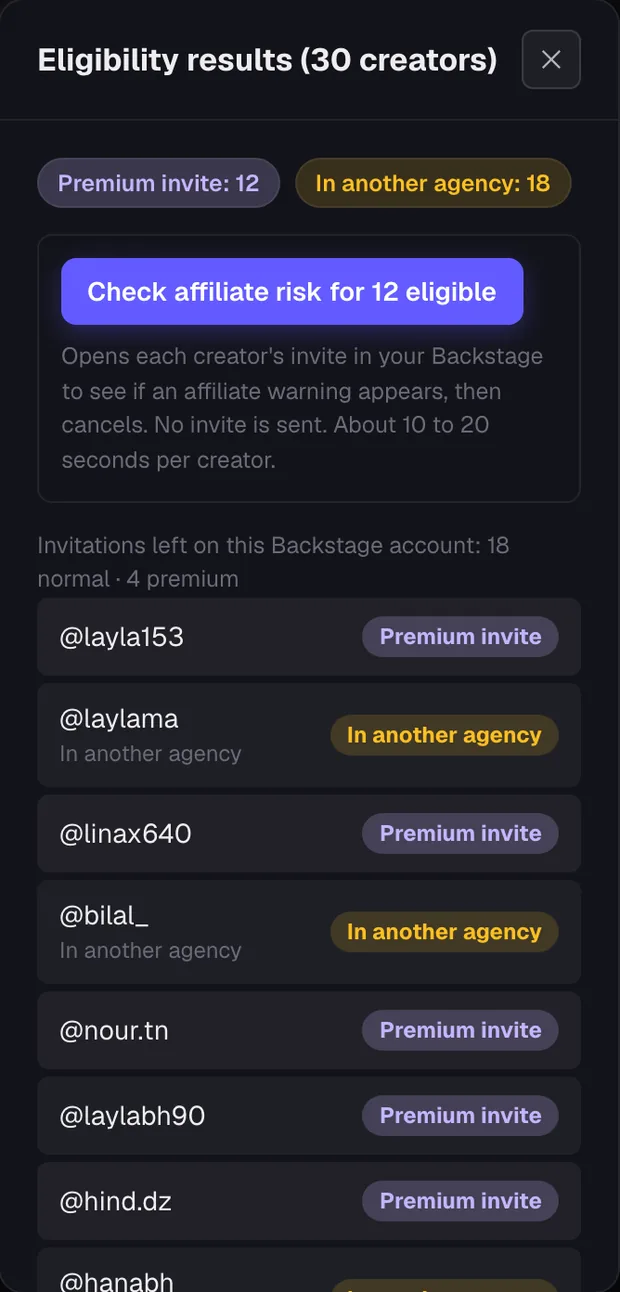
Privacy and limits
Your Backstage password is used once to sign in and is never stored; only the signed-in session is kept, and disconnecting deletes it. The checker only reads results. It never sends invites.
- Results follow your agency's region, invitation types and invitations left
- Up to 30 creators per check and 3,000 per account per day
- If TikTok asks for a security check, you solve it in the live window and run the check again
- Up to two signed-in devices per member account; accounts are not shared
For TikTok LIVE agencies in every region
Scout Tools supports TikTok LIVE agencies in all regions: MENA, LATAM, Turkey, Europe, the United States, Australia and more. Each check runs in your agency's own Backstage, so the result follows your agency's region. Read how it fits your market:
- MENAArabic interface, the 18 MENA league divisions and checks from your own Backstage.
- LATAMSpanish- and Portuguese-speaking markets, cross-border recruiting and a page in each language.
- TurkeyA Turkish guide page, invitations-left tracking and checks before every outreach.
- EuropeMany countries and languages, clear reasons and GDPR-style privacy rights.
- United StatesBatch checks at volume, CSV export for your CRM, billing in USD from a US company.
- AustraliaBackground checks on your own schedule, saved results and USD billing explained.
Eligibility checker FAQ
Is the eligibility checker made by TikTok?
No. It is an independent tool by Devign, not affiliated with, endorsed or sponsored by TikTok or ByteDance. It works with your own TikTok LIVE Backstage account.
Why do I need to connect my own Backstage?
Eligibility depends on the agency asking. Running the check in your own Backstage session gives you the answer your agency would get when it invites.
How many creators can I check?
Up to 30 per check and up to 3,000 per account per day.
Does checking a creator send them an invite or notify them?
The checker never sends an invite. To read the invite type and any warning it may open the creator's invite in your Backstage and then cancel it.
Does it work for agencies outside MENA?
Yes. Scout Tools supports TikTok LIVE agencies in all regions, including LATAM, Turkey, Europe, the United States and Australia. Each check runs in your own Backstage, so the result reflects your agency's region and invitations.
Where do I see the results later?
On your board, in the Backstage eligibility column, with the time of the check. You can filter by any result and export the list.
Guides for TikTok LIVE agency recruiters
- Premium invite vs Normal invite on TikTok LIVE BackstageWhat Premium invite and Normal invite mean in a TikTok LIVE agency eligibility check, how Scout Tools reads them from your Backstage, and what to do with each.
- Affiliated account risk (multiple-account risk) on TikTok LIVE BackstageWhat the Affiliated account (multiple-account) risk warning means in a TikTok LIVE agency eligibility check, how Scout Tools detects it, and what agencies do next.
- How to check a TikTok LIVE creator before you invite them to your agencyA step-by-step routine for TikTok LIVE agencies: find creators, check eligibility for up to 30 at once from your Backstage, read the results and shortlist.
Check your first 30 creators
$316.44 per month, including processing costs. Renews monthly until canceled.